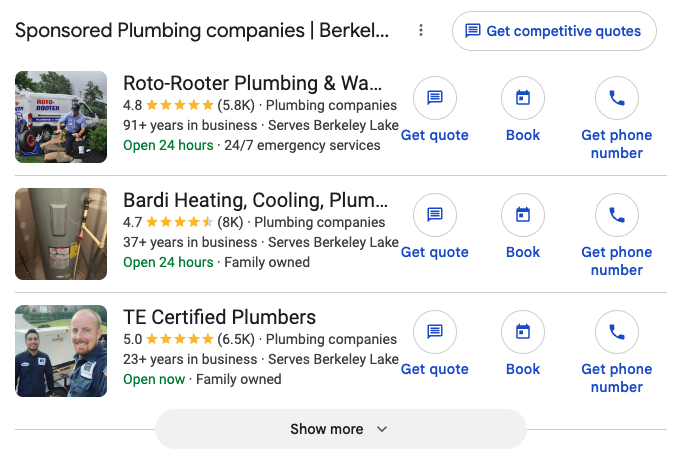
Local Services Ads

Prepare for the LSA to Performance Max Pay-Per-Lead Migration

Local Services Ads are moving into Google Ads as a specialized Performance Max campaign with pay-per-lead goals. Ads still show on Search and Maps, and you still pay for valid leads, not clicks. Prepare now so the migration does not blindside your reporting, budgets, or intake.

Book a Strategy Call
Prepare for the LSA to Performance Max pay-per-lead migration
What’s Changing vs Not

Same Channel Product. New Management Home.

Per Google Ads Help, not rumor. Know what moves and what stays before you rewrite your playbook.

Not Changing
Still Pay Per Lead
  • ✓
    Billing: You still pay for valid leads (calls and messages), not for ad clicks.
  • ✓
    Placement: Ads continue on Google Search and Google Maps in the same local positions.
  • ✓
    Keywordless: Targeting still runs on categories, areas, and settings, not a keyword list.
  • ✓
    Intent focus: The product still aims at high-intent local customer connections.
Changing
UI Into Google Ads
  • ●
    Management home: Budgets, targeting, and lead reply move into Google Ads instead of the separate LSA dashboard.
  • ●
    Reports: Historical LSA performance reports do not carry over, export or screenshot before migration day.
  • ●
    Budget shape: Weekly budgets convert to a daily average (weekly ÷ 7) as Google describes.
  • ●
    Not standard PMax: This is not CPC Performance Max across YouTube, Display, and Gmail.

Channel overviews: Local Services Ads and Google Ads. Comparisons: Ads vs LSA for law firms and LSA vs Ads for pool companies.

Timeline

Phased Rollout, Not One Fake Date for Everyone

August 2026

First wave for select U.S. home and storefront trades, including plumbing, HVAC, electrical, appliance repair, house cleaning, lawn care, roofing, pest control, and moving.

Late 2026

Broader advertiser groups, including many service-area businesses without storefronts and accounts with custom bidding or booking setups.

2027

Remaining categories and non-U.S. accounts transition. Watch your admin email and LSA banners, not a third-party calendar.

Google says the account administrator gets an advance email about 14 days before the account-specific migration date, plus dashboard banners and a later reminder. Treat Google Ads Help as the source of truth for timeline and product details. No blog post, including this one, can invent guarantees for your account.

Prep Checklist

Do This Before Migration Day

Export historical LSA reports

Performance history does not carry over. Screenshot or export spend, leads, and trends you need for year-over-year comparisons.

Hours = staffed hours

Business hours sync from your Google Business Profile. If you list hours you do not answer, you set yourself up for missed contacts and billable-risk pain.

Call routing & responsiveness

Confirm the phone and message path that will receive leads in Ads. Speed still decides whether a lead becomes a booked job.

Weekly budget becomes daily

Expect your historical weekly average to become a daily average (÷ 7) as Google describes. Monthly spend logic stays capped, do not panic at the daily number alone.

Lead feedback in Ads

Learn where Leads live under Goals, then Conversions in Google Ads. Bad leads still need a weekly rating and credit check habit in the new UI.

Allow stabilization time

Google notes many ads may run right away, but allow up to about two weeks for the process and performance to settle. Do not rebuild the account on day one noise.

Selecting your Business Profile for pay-per-lead also creates an account-level link that can show your location on other campaigns through location assets, which can make those campaigns eligible for automated promotions. See the Google Ads auto-settings audit for where to check and how to turn it off.

Transition Day Worksheet

What Google Turns Off, Merges, or Pauses When You Move

Most of the move is automatic. These seven changes are not cosmetic, and each one needs a decision from you before the 14-day email lands. Every row comes from Google Ads Help (checked October 19, 2026).

What changesWhat it means for youDecide before your email lands
Manual bidding endsGoogle says manual bidding, such as setting a maximum cost per lead, “is no longer supported in Google Ads.” If a max bid is how you keep lead cost in line today, that lever is gone on transition day.Write down your current max bid and your real cost per booked job by service. You will need your own numbers to judge automated bidding, not the first week’s average.
Per-category targets become oneIf you run different Target CPA amounts for different categories in one campaign, Google calculates “a unified campaign-level Target CPA” and applies it to all of them. A cheap repair category and an expensive install category end up chasing the same blended number.Pick the categories that truly need their own target. Google’s fix is separate campaigns per vertical (its example is plumbing and HVAC).
BBB callouts are gone“BBB callouts are no longer supported.” If your ad leaned on that line, it disappears.Choose at least 6 other structured callouts in Assets. Google suggests things like business hours, specialties, and accepted payment methods.
Big profile edits trigger a reviewName, address, and hours sync one way from your Google Business Profile into Ads. A significant change to your business name, storefront address, or primary category triggers a verification review that “typically takes 24 to 48 hours, during which your campaign may temporarily pause.” Hours, phone, and minor name edits sync within 24 hours.Schedule rebrands, moves, and category changes for a slow week, never the start of your peak season. Make them in your Business Profile, not in Ads.
Weekly budget becomes dailyYour average weekly budget is divided by 7. Daily spend can run higher on busy days, but monthly spend is capped at the daily average times 30.4.Judge spend by the month. A high day is not overspend.
Lead emails go to everyoneAll account users and direct managers are opted in to call and message lead emails by default, whatever you set in the old dashboard. At least one user has to stay opted in.Decide who should actually get lead alerts and turn the rest off under Admin, Notifications, so the person who calls leads back is not buried in copies.
No new pay-per-lead campaigns in Ads yetGoogle says you can’t create new campaigns with pay-per-lead goals inside Google Ads “at this time.” New campaigns or local accounts still start at g.co/localservices.If you plan to split categories into separate campaigns, check where that build happens on the day you do it.

One habit does not change with the platform. Missed calls during the business hours you publish can count as chargeable leads, so list only hours you can staff, route calls to people who answer, and reply to messages fast. We are not going to guess how any single lead credit will land. Read Google’s current lead and credit guidance for your account and build intake that holds up under the rules as written.

What Ostmen Does

Manage LSA Through Migration. Track to Booked Jobs.

We manage Local Services Ads through the transition, report backups, hours and routing checks, budget shape, and lead feedback workflows in Google Ads. Leads are tracked to booked jobs, not vanity dashboards that look fine while the calendar is empty.

We also pair LSA with Search and SEO so you are not dependent on one UI when Google moves the furniture. For trade-level strategy, see service businesses, or contact us.

We are a Google Partner agency with a money-back guarantee. The scoreboard is work you book.

Local Services Ads for home service businesses
Related

Keep Going

Questions

Frequently Asked

Is LSA becoming regular Performance Max?

No. Google is migrating Local Services Ads into a specialized Performance Max campaign type optimized for pay-per-lead goals. It is not the same as standard CPC Performance Max that runs across YouTube, Display, Gmail, and the rest of the Google network. Pay-per-lead placements stay on Search and Maps.

Will I still pay per lead after the migration?

Yes. Google states you still only pay for valid leads, such as phone calls and messages, rather than ad clicks. The billing model stays pay-per-lead; the management UI moves into Google Ads.

When does my LSA account migrate?

Google is rolling out in phases: August 2026 for select U.S. home and storefront trades, late 2026 for broader groups including many service-area businesses, and 2027 for remaining categories and non-U.S. accounts. Your account-specific date comes by email and LSA dashboard banners, treat Google Ads Help as the source of truth, not a blog timeline.

Can I still set a maximum cost per lead after the migration?

No. Google says manual bidding, such as a maximum cost per lead, is no longer supported in Google Ads, and per-category Target CPAs inside one campaign are merged into one campaign-level target. If categories need different targets, Google points to separate campaigns per vertical.

Do historical LSA reports move into Google Ads?

No. Google says previous campaign performance reports do not carry over. Export or screenshot historical LSA reports before your migration day. Past customer lead history does transfer into the Google Ads Leads page.

How does Ostmen help with the LSA to Performance Max migration?

We manage Local Services Ads through the transition, keep hours and call routing honest, set up lead feedback habits in Ads, and track leads to booked jobs, not vanity dashboards. We also pair the channel with Search and SEO so you are not LSA-only when the UI changes.

Don’t Let Migration Blindside Intake

Book a strategy call. We will map your prep checklist, reports, hours, routing, and how Search and SEO cover you through the LSA to Performance Max move.

Book a Strategy Call