
Google’s AI Mode can book a home service business if you take bookings through one of Google’s partners. Since November 4, 2026, AI Mode in the US has shown booking links for home services through Angi, Thumbtack, Housecall Pro and Jobber, Search Engine Roundtable reported. ServiceTitan is listed as coming soon.
If you book through anything else, Google has not said AI Mode can book you. Find your path below, then book yourself once before a homeowner does.
The Four Booking Paths, and Which One Is Yours
Google says AI Mode passed one billion monthly users in its first year (Google I/O post, May 19, 2026). That post also said agentic booking would add local services, with “direct links to finish booking through the provider of your choice.” For a home service business, that provider is one of four things.
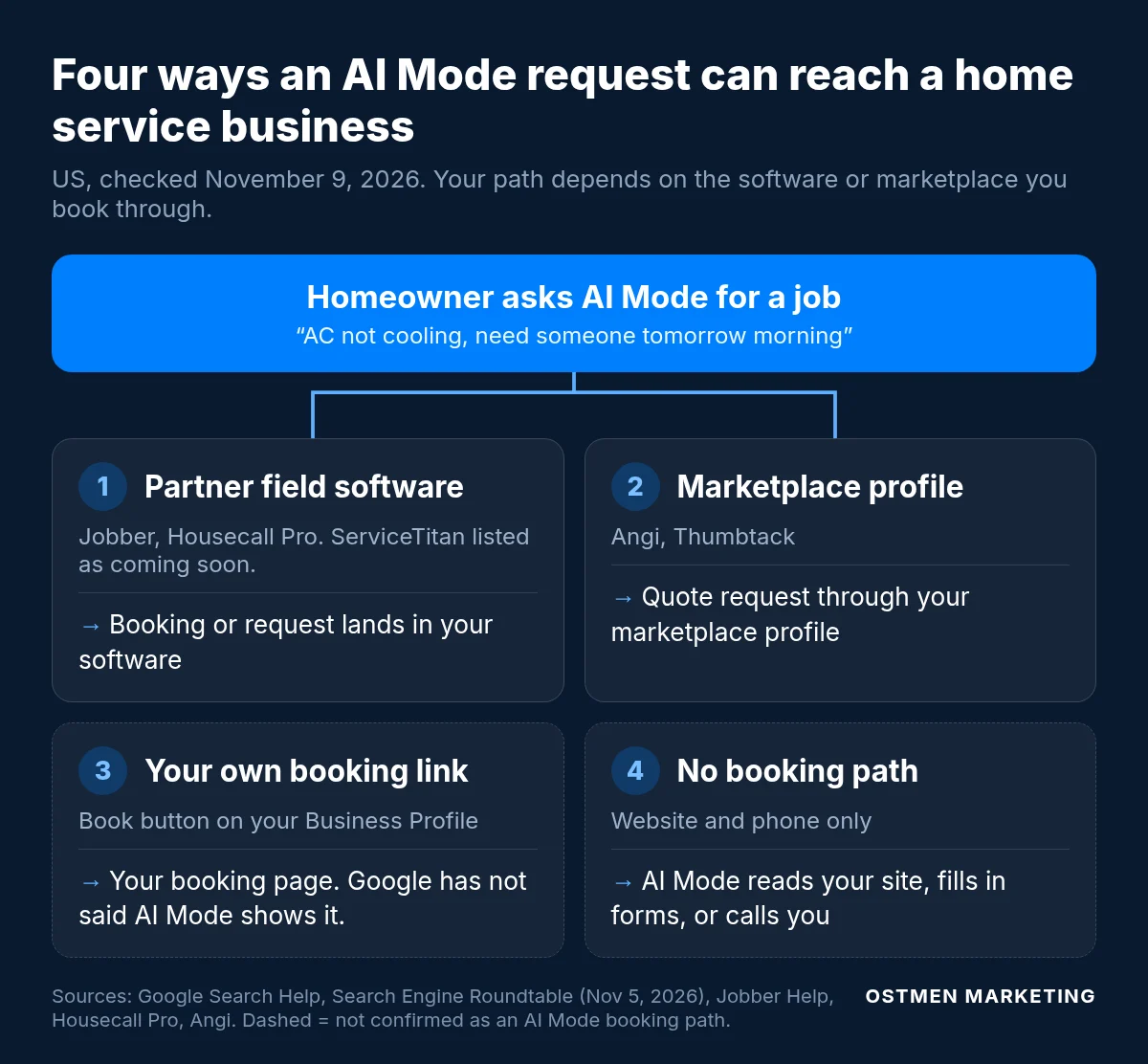
| Path | What the homeowner gets | Check first |
|---|---|---|
| 1. Partner field software: Jobber, Housecall Pro (ServiceTitan listed as coming soon) | On Jobber, a Book Online button on your Business Profile that opens your Jobber form. On Housecall Pro, a request sent from the free slots on your calendar. | Jobber requires a paid US account (trials cannot appear), Help clients find my business turned on, a complete address, a Business Profile connected at that same address, and a form assigned to Google (Jobber Help, updated Nov 4, 2026). Housecall Pro’s partner page says every pro is auto-enrolled, and its help center also says pros are opted in automatically, while its November 4 release says the integration is “coming soon to eligible US customers.” Check the settings in your account. |
| 2. Marketplace profile: Angi, Thumbtack | Angi says the homeowner lands on your Angi profile and requests a quote there (Angi, Nov 4, 2026). | The services, towns and photos on that profile match your website, and someone answers each quote request on the day it arrives. |
| 3. Your own booking link on your Business Profile | A Book button that opens your scheduler. Google has not said whether AI Mode shows these links for home services. | Google’s link rules in row 3 of the run sheet below. ServiceTitan’s current Reserve with Google setup is this kind of button today. |
| 4. No booking path | AI Mode gathers information from the web, completes forms, or calls businesses when the answer is not online (Google Search Help). | Your service pages and whoever answers the phone. Our guide to when Google’s AI calls your business covers both. |
Google has not explained how AI Mode picks or ranks providers, or whether you must use a partner to be recommended (Search Engine Land). Google’s AI Mode help page does not mention the partner links yet.
Jobber says reviews help AI Mode decide which businesses to recommend (Jobber Help). That is Jobber’s statement, and Google has not published one. For where reviews surface today, see where your reviews actually show up.
The Test Booking Run Sheet
Run this on a phone signed in to a personal Google account, with your field software open on a laptop. Fill in the last column as you go. Each failed row is a fix to make before a homeowner finds it.
| Step | Do this | Pass looks like | Your result |
|---|---|---|---|
| 1 | In AI Mode, ask for a job you want, in a town you serve, the way a homeowner would: “AC not cooling, need someone tomorrow morning in [town].” | Your business appears with a booking or quote button. Housecall Pro’s help page shows results with Request a quote, Call, Directions and Website buttons, and some with open times. | Pass / Fail |
| 2 | Search your business name and open your Business Profile. | A Book Online button that opens your booking form. Jobber says this usually appears within a few days of a match (Jobber Help). ServiceTitan says Business Profile matches typically take 24 to 72 hours (ServiceTitan Help, Oct 15, 2026). | Pass / Fail |
| 3 | Tap the button. | The form for this location loads with no login and no CAPTCHA. Google requires booking links to reach a dedicated page for your business where the customer can finish the booking. Its link checker must also load the page without a CAPTCHA or login (Business links policies). | Pass / Fail |
| 4 | Read what the form offers. | Only job types you want booked online, only towns you serve, and times your crews can keep. Jobber says AI Mode follows the booking settings, hours and availability windows you already set in Jobber (Jobber Help). Housecall Pro says it pulls open times from your calendar (partner page). | Pass / Fail |
| 5 | Book a slot as a test customer, using your name and cell number. | You get the confirmation a customer would get, and it says plainly whether the visit is confirmed or someone will call to confirm. | Pass / Fail |
| 6 | Find the test booking in your software. | It sits where your team looks each morning, under a source you can filter. Housecall Pro labels it “Google AI” in the Job Inbox (Housecall Pro Help). Jobber shows it like any other online booking or request (Jobber Help). | Pass / Fail |
| 7 | Cancel the test booking and write down the date. | Calendar clear. Rerun the sheet once a month and after any change to your form, hours or service area. | Done |
If step 1 fails but steps 2 to 6 pass, your setup works and AI Mode did not pick you for that search. One search is one sample. Repeat it on another day and with a second job type before you change anything.
Auto-Confirm or Approve Each Booking
Jobber confirms assessment bookings automatically, including ones from AI Mode, unless you turn on Require assessment booking approval (Jobber Help). With approval on, they arrive as Needs approval and you accept or decline each one.
Leave auto-confirm on only if every job type and town in the form is work you always take. If you screen jobs by size, equipment brand or drive time, turn approval on. Then name one person who clears the approval queue at a set time each morning.
Count AI Mode Bookings as Their Own Source
We judge every channel on cost per booked job, and AI Mode bookings need a dedicated line in your report for that to work. If they arrive untagged, they blend into website bookings and you cannot tell what the new source is worth. Set it up once, per platform:
- Housecall Pro. Filter the Job Inbox by Google AI. Reserve with Google and Local Services Ads leads sit in a separate Google inbox (Housecall Pro Help), so count the two apart.
- Jobber. AI Mode requests come through whichever form is connected to Google. If your website uses that form too, connect a separate form to Google so the source stays clear.
- ServiceTitan. Its Reserve with Google setup tags bookings to a marketing campaign it creates for you (ServiceTitan Help). Leave that campaign in place so Google bookings stay countable.
- Any platform. Once a week, count AI Mode bookings that were kept and cancelled, next to your Local Services Ads and Search ad bookings.
We set up this booked-job reporting for HVAC companies and plumbing companies too. The source tag is part of our AI search visibility work.
Your Next Step by Software
- On Jobber. Check the Jobber requirements in path 1 this week, then run the sheet.
- On Housecall Pro. Open Settings, then Job Inbox, and confirm the Google AI toggle is on. Then run the sheet.
- On ServiceTitan. AI Mode lists it as coming soon. Your Reserve with Google setup already puts a Book Online button on your profile, so run steps 2 to 7 on it now.
- On Angi or Thumbtack. Treat that profile as the page the homeowner reads, and match its services and towns to your site.
- On anything else. Keep prices, hours and service area on your service pages, and cover the phone. Hold off on switching software for this alone until Google says how it picks providers.
Questions
Do I need a Google Business Profile to be booked in AI Mode?
It depends on the platform. Jobber requires a Business Profile connected at the same address as your Jobber account (Jobber Help). Housecall Pro’s partner page says you do not need one.
How do I turn off AI Mode bookings?
In Jobber, turn off Help clients find my business, or remove the form’s connection to Google. In Housecall Pro, switch off Google AI under Settings, then Job Inbox. For other third-party booking links on your Business Profile, Google says to ask the provider, and providers must process opt-outs within 5 business days (Google Business Profile Help).
Want Us to Run the Test With You?
On a strategy call we run the sheet with you on your Business Profile and booking form. Then we set up the source tag so AI Mode bookings show up in your cost per booked job.
Book a Strategy CallSources, read November 9, 2026. Google: Use AI Mode to check local availability and pricing. Google Search’s I/O 2026 updates (May 19, 2026). Business links policies and guidelines. Manage your local business links. Partners: Jobber Help (Nov 4, 2026). Housecall Pro partner page, release (Nov 4, 2026) and help page. Angi release (Nov 4, 2026). ServiceTitan Help (Oct 15, 2026). Coverage: Search Engine Roundtable (Nov 5, 2026). Search Engine Land (Nov 4, 2026).

Brock Anderson is the founder of Ostmen Marketing. He runs Google Ads, Local Services Ads and AI search visibility work for service businesses and judges every channel by cost per booked job.